No one shoot me for that title. With Christmas less than 3 months away (yes, you heard me) I am already looking ahead to how I want to be organized in 2014. And not just in my space but with my time as well. My first novella will come out in early 2014. That means added social media and blogging tasks to what I already do. Until now I've been building a network and letting people get to know me. I'll have to continue that aspect and meeting new people while letting the world know I have a book out and more to follow soon (That's the plan). To accomplish everything I want to do, I HAVE to plan ahead.
I've been pinning lots of 'printable forms' to my Organized Home board on Pinterest. As I began figuring out what I wanted from my new planner, I visited a lot of the websites from those pins. Here's what I came up with:
I used papers from Colorbok Rosewood slab. Fits in with the peach/blue/ vintage I want to use in the office. The quote at the bottom says:
Go confidently in the direction of yours dreams. Live the life you have imanged. ~Henry David Thoreau I've always loved that quote and appropriate for the purpose behind this planner. To go confidently towards a full-time published author.
Knowing what you need in a planner is important. Like other aspects of our life, they are not a One Size Fits All. I'm going to walk you through the pages and why I chose them for this planner.
 |
CALENDAR PAGE
|
This is an example of a calendar page. I started the planner with December 2013 and ended with January 2015. Out of all the calendar pages I looked at, this one from Infarrantly Creative most fit my style. A basic calendar month with a spot at the bottom for notes. The main thing I use a calendar for is to keep track of Bob's boat schedule. This lets me see at a glance whether or not I can plan to attend a conference or concert. Someone has to be here to take care of the doggies. The other thing I liked about Infarrantly Creative is her planner is put together from a BLOGGING perspective... which is 80%+ of my day.
Behind the monthly calendar The rest of the month is broken up into WEEKS. So the next page is my Master To-Do List for the coming week:
 |
WEEKLY MASTER TO-DO
|
I can list what I need to accomplish for the week, the Due Date and rank the item in priority.
 |
| SOCIAL MEDIA TRACKER |
How many times have you entered a challenge or contest on someone else's blog then forgot about it?
The next page (printed on the back side of the Master To-Do, creating the left page) is my Social Media planner is to make note of when I post on someone else's blog. I also make note if I took part in a challenge, shared a post from one of their contests and/ or entered a contest.
 |
| WEEKLY PROJECT PLAN |
This is where I make more detailed notes about projects for specific blogs. I can also track Pagiviews on any given blog to see how things are going, twitter/ fb/ pinterest new followers.
One of the things the gal from Infarrantly does (which this printable is from her site, too) is to make sure to encourage a fellow blogger. There's a space for noting which blogger I'm boosting that week.
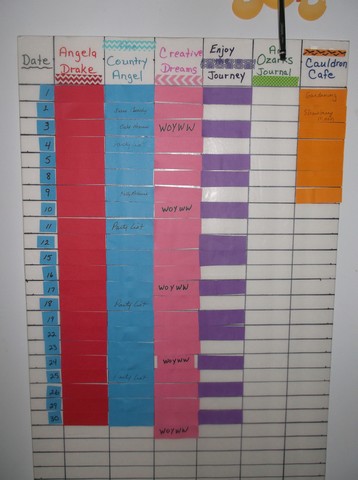
This is my BIG page. I list all of my blogs on every day of the week that I want to post on that particular day and what the daily theme is. You'll see the colored in squares.. those are the bullets for that blog. Then the blank one below each one is my 'check off' box for that post. I'll probably use the Weekly Goals at the top of the page for scribbling notes or tracking my WOYWW Blog #s of those I visit each week.
I thought I had a single shot of the right hand page. This is BOOKS READ. I can track the Title/ Genre/ Author/ Length of 4 books per week plus write a brief review or note where I'll post a review. I'm hoping this page will help me remember to actually post reviews for books I read as I know this is very helpful for an author.
Finally, this last page I created to keep track of what type of Fiction project I work on each day. I can track the number of new words as well as number of pages edited as I am usually working on one while editing another. There's room at the bottom for notes as I'm writing/ editing I want to make sure I take care of.
With the exception of the printables I've already credited, most of the others came from
Life Your Way They have over 300 downloadable templates! You can pick the ones you want for free or you can purchase a download of ALL of them for $7!
Once I had everything printed and the pages in the order I wanted them, I clamped everything together really well with Jumbo Binder Clips then took it into the UPS store and had it spiral bound with a clear coat sheet on the front.
That is my Planner for 2014.
I'd love to hear about yours. What do you need a planner to do? (the hard copy kind, not the human kind hehe